


Starting an Online Business: When Will You Find the Time?
 |
| Image Credit: Morgue File |
"I don't have the time" seems to be the most well-worn excuse in the world. If this excuse were a shirt, it would be faded and badly frayed at the seams. In fact, I'm ashamed to say that this was once my favorite excuse — and maybe still is (which explains why it took me a year to update this blog). However, I've realized that, more often that not, we have the time to do the things that we've always wanted to do, but we just don't know how to find it. If you want to build your online business, having more time is not the solution, but managing time may well be. Twenty-four hours is all you get in a day, so you need to be able to manage it and use it well.
First, you may want to sit down and take a few moments to think about how you have been spending your time. You might be shocked to learn that you have been actually wasting a lot of the precious minutes that you have been given in a day.
A lot of people think they need to quit their day job in order to start an online business. This is a dangerous mistake. Like brick-and-mortar businesses, an online business has inherent risks. You should not expect to earn a full-time income on your first month in the business. You may even have to fail before you can succeed.
If you are relying on your day job for survival, meaning if your job pays the bills and feeds you and your family, don't pass that resignation letter yet (or tell your boss to shove it). Keep your job and then slowly build your online business empire. Start growing your business part time.
There are many ways to find time to work on your online business. First, you can get out of bed earlier than usual so that you can work. Instead of whiling your lunch break away chit-chatting your co-workers, why not use the time to work on your business? Since your business will be online, you can work anywhere. You can invest in a laptop and find a cafe with WiFi access. You can also buy a USB modem so you can work anywhere you want as long as the modem is able to pick up the signal from your Internet service provider.
If you commute to work or if someone else is driving for you, you can use the time to work on your business. However, if some circumstances do not allow you to work, then you may use that time to brainstorm. If you don't feel comfortable bringing a laptop in a public place, you can use your smart phone to visit websites, send emails and even post articles on your blog.
At home, you may want to give up watching television or at least reduce the time you spend in front of the boob tube. You may also want to delegate some of the chores you do at home so you can spend more time growing your business.
You can start growing your business part time, but you need to be consistent with your efforts. You also need to be patient. Work until you reach the level of income that will allow you to comfortably let go of the job that you now have.
There is no better time to start your online business than today. Start with what you have and what you know and build from there. Learn from mistakes and discover new things. Allow your new discoveries to excite you. Remember, time is one of those things that you will never get back once you've lost it.
Stay tuned for more moneymaking tips and more information about starting your online business.
Fiverr: A Fun Way to Make Money Online!

Fiverr is a site where you can offer services or products for a flat rate of $5. It is open to everybody around the world. Every offer is called a "gig." You can offer services like writing, transcription, logo design, Wordpress installation and a whole lot more. You can even sell tangible items and mail them to buyers who will have to pay additional fees for shipping. You can also offer to do something wacky. You'd be surprised to know that a lot of people are willing to pay someone to shoot a video of himself or herself singing a message in the shower for 30 seconds. If you are a hottie, you can get paid for taking a picture of yourself holding a sign or having a name, a slogan or a message written on your cheek or, if you're a woman, your cleavage. (Of course, that's as far as you can go when it comes to exposing your body. You can't show your nipples or your private parts. Don't push the envelope or you'll get banned!)
I have earned some good money from Fiverr as a freelance writer. I offered to write a 350-word article for $5 and got a 100% positive gig rating from my customers. Unfortunately, my gig had to be taken down because I posted my email address, which I later learned was a no-no. Ah, well. Lesson learned.
Here are some tips on making money on Fiverr:
1) Offer a gig that will take minutes to complete -- 20 minutes at most. If it will take longer than that, then it's not worth it. Your customer will pay $5 for your gig, but you will only get $4 because Fiverr gets a 20% cut from whatever you earn from the site.
2) Look for popular gigs. To do this, filter the gigs on the home page by clicking the link shown below:

You can offer a gig that has never been offered before, but if you want to be sure that you are going to make money off your gigs, you can offer gigs that are similar to those that are already popular. Spy on your competition and find ways to outdo their offers without having to spend a lot of time on a gig. For instance, if your competitors say they can deliver within two or three days, you could tell buyers that you can give them what they want within 24 hours. Never, ever break your promises though or you could get negative ratings and/or comments from your customers.
3) Craft an attention-grabbing headline for each of your gig. Make sure that you include a strong benefit. A good example of a gig headline would be "I will write a well-researched, entertaining and completely original 350-word article for $5."
4) Make sure that your gig description is enticing. Write a brief summary of your gig. Tell prospective buyers what sets you apart from others who are offering similar gigs or list the benefits that they will get when they order your gig.
5) Do your best to be a top seller on Fiverr. Follow the rules and stay out of trouble. Deliver on time and make your customers happy. Why be a top seller? Top sellers on Fiverr enjoy special privileges. They can offer gig extras and value-added deals. Buyers can also order more than one of the same gig through the quantity option, which is not available to non-top sellers. On top of that, top sellers also get VIP support, which means that their support tickets are prioritized.
For more information about being a Fiverr top seller, click this link.
Since Fiverr launched in February 2010, there have been a lot of Fiverr clone sites. Here some sites that are similar to Fiverr:
GigBucks
TenBux
Zeerk
FittyTown
Tenyt
You may post gigs on these sites and charge more than $5 per gig. However, buyers visit Fiverr more than any other website of its kind. In other words, you are more likely to see sales on Fiverr because it gets more traffic than its clones.
Be sure to have your PayPal account ready before you sign up on Fiverr. You should also know that you have to wait approximately two weeks from the date of sale before the money is transferred to your PayPal account. You should also remember that buyers may cancel their orders if you fail to deliver on time.
Posting a gig on Fiverr is a good way to earn some extra money. You just have to be creative. Now, go make some dough and have fun!
Please share your opinion on Fiverr in the comments section and let me know if you have questions. I'll be happy to answer them.
Finally, I Have Updated My Blog!
It's been more than a year since the last time I posted an entry. I had been too busy to update my blog, but I have decided to make time for this project. I want to help people who want to earn a full-time income in the comfort of their homes.
So what have I been up to? I still work at home. I love being able to work on a flexible schedule, but I miss working with people. Currently, I have two jobs and, occasionally, I get some writing gigs. Last February, I earned the income I could only dream of a few years ago. Life has been good!
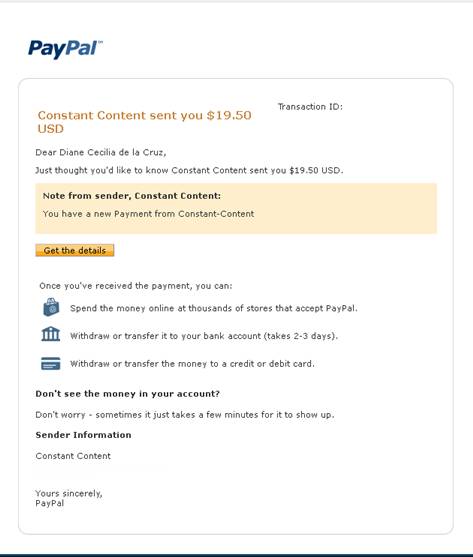
I got a comment last month from a reader who wonders if Constant Content is legal. It is and a lot of writers besides me can vouch for that. You can do a little research on Google to find out more about the site. I have been writing for Constant Content for a couple of years and I have just recently made a sale. This morning, they just transferred $19.50 to my PayPal account. Sweet! Here's a screen shot of the email:
If you want to write for ConstantContent, make sure that your articles are completely free from grammatical and spelling errors. The editors at Constant Content have high editorial standards and your articles can be rejected for the smallest of errors like misplacing a comma or failing to end a sentence with a punctuation mark. You may always re-submit your articles when you have corrected the errors. It's also good to have someone edit your work. Don't be afraid of rejection. Use the editors' criticisms to your advantage. Learn from them and always aim to produce top-quality articles. Don't forget to proofread your articles before you submit them:
Here's a free online tool that I use for proofreading:
http://www.paperrater.com/
Paper Rater is even better than the built-in grammar and spelling checker in MS Word or any other word processor. Aside from calling your attention to grammatical and spelling errors, Paper Rater gives you suggestions on word usage and helps you detect duplicate content if you choose to enable the originality detection function. However, all grammar and spelling tools are imperfect. They don't detect errors like the misuse of "their," "there" and "they're." It's always best to read the final draft of your article carefully before submitting it to Constant Content.
You can look forward to more articles about freelancing, affiliate marketing and other moneymaking opportunities as well as money saving tips and product reviews. Stay tuned!
So what have I been up to? I still work at home. I love being able to work on a flexible schedule, but I miss working with people. Currently, I have two jobs and, occasionally, I get some writing gigs. Last February, I earned the income I could only dream of a few years ago. Life has been good!
I got a comment last month from a reader who wonders if Constant Content is legal. It is and a lot of writers besides me can vouch for that. You can do a little research on Google to find out more about the site. I have been writing for Constant Content for a couple of years and I have just recently made a sale. This morning, they just transferred $19.50 to my PayPal account. Sweet! Here's a screen shot of the email:
If you want to write for ConstantContent, make sure that your articles are completely free from grammatical and spelling errors. The editors at Constant Content have high editorial standards and your articles can be rejected for the smallest of errors like misplacing a comma or failing to end a sentence with a punctuation mark. You may always re-submit your articles when you have corrected the errors. It's also good to have someone edit your work. Don't be afraid of rejection. Use the editors' criticisms to your advantage. Learn from them and always aim to produce top-quality articles. Don't forget to proofread your articles before you submit them:
Here's a free online tool that I use for proofreading:
http://www.paperrater.com/
Paper Rater is even better than the built-in grammar and spelling checker in MS Word or any other word processor. Aside from calling your attention to grammatical and spelling errors, Paper Rater gives you suggestions on word usage and helps you detect duplicate content if you choose to enable the originality detection function. However, all grammar and spelling tools are imperfect. They don't detect errors like the misuse of "their," "there" and "they're." It's always best to read the final draft of your article carefully before submitting it to Constant Content.
You can look forward to more articles about freelancing, affiliate marketing and other moneymaking opportunities as well as money saving tips and product reviews. Stay tuned!
Writing for Money? Try Constant Content!
I'm very excited because I've been writing for money these past few months and this is the first time I've actually earned from writing efforts. Somebody bought my article from Constant Content! Yipee! I've been thinking of offering my services as a ghostwriter to some Internet marketers, but I have not done so. Well, at least, not yet. I never thought that I'd be good enough. Besides, I need money to be able to sell my services on forums like Digital Point and Warrior Forum.
I didn't expect to sell any of my articles, but I put them up anyway because I just wanted to try the site. This morning, however, I had a pleasant surprise. I received an email from PayPal letting me know that one of the articles I put up on Constant Content was sold and the buyer bought the exclusive rights to my article which means he or she paid the highest price I set for it. As of this writing, I have three left, so I sold one out of the four articles I submitted at Constant Content, which is not bad at all.
Constant Content is a content market place. You may submit your articles in .txt or .doc form to be sold to website or blog owners. You may also submit pictures, illustrations and videos to the site. Each time an item is sold, you split the sales proceeds with the site -- 65% goes to you and 35% goes to Constant Content. You can name your price for different usage levels (usage, unique or full rights). Some customers of the site make public requests for articles. You can respond to these customers so you can get paid to write articles for them.
As proof that Constant Content pays, here is a screen shot of the email I received from PayPal telling me that I received some cash from the site:
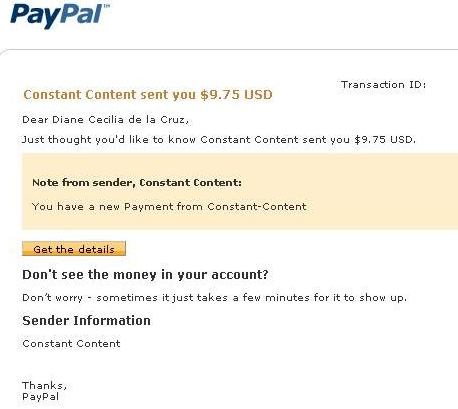
Note: I "whited out" the transaction number and Constant Content's contact information.
To sign up for a Constant Content account, click here.
I didn't expect to sell any of my articles, but I put them up anyway because I just wanted to try the site. This morning, however, I had a pleasant surprise. I received an email from PayPal letting me know that one of the articles I put up on Constant Content was sold and the buyer bought the exclusive rights to my article which means he or she paid the highest price I set for it. As of this writing, I have three left, so I sold one out of the four articles I submitted at Constant Content, which is not bad at all.
Constant Content is a content market place. You may submit your articles in .txt or .doc form to be sold to website or blog owners. You may also submit pictures, illustrations and videos to the site. Each time an item is sold, you split the sales proceeds with the site -- 65% goes to you and 35% goes to Constant Content. You can name your price for different usage levels (usage, unique or full rights). Some customers of the site make public requests for articles. You can respond to these customers so you can get paid to write articles for them.
As proof that Constant Content pays, here is a screen shot of the email I received from PayPal telling me that I received some cash from the site:
Note: I "whited out" the transaction number and Constant Content's contact information.
To sign up for a Constant Content account, click here.
Internet Marketing: How Do You Make Money from Scratch?

Of course, you will need to hone your writing skills because, as the name of this marketing method suggests, article marketing entails writing a lot of articles and submitting them to article directories and Web 2.0 sites. You will also need to set up a free blog either at Blogger.com or WordPress.com. or a website at Weebly.com You need to write articles as part of your efforts to promote other people's products from sites like Clickbank, Commission Junction and Paydot.com. You will get a commission for each sale and the best part is your only job is promoting the products. Those who own the product will take care of closing the sale, customer service, inventory and the like.
If you hate writing or think that you are talent-free when it comes to putting your thoughts into words, do not despair. Writing articles is not rocket science. All you need is the willingness to make the effort to study, research and write.
Writing an article is simple. You do not need to produce a literary masterpiece. Just write as you talk. Your mission as an article writer is to provide information that your readers need. Also, you do not need to write lengthy articles. When you write for the Internet, you need to be as concise as you can possibly be. Your readers have short attention spans. You need to get right to the point or else they will stop reading your article before they reach your resource box.
What is a resource box? This is the part of the article where article directories allow you put the link to your website or blog. Here, you offer more information to your readers which they will get if they click the link. This is how your website or blog gets exposure. These links count as a back link which will help you in your search engine rankings. A back link is a link to your website found in another website. To Google and other search engines, a back link counts as an authority vote. The more back links you have, the higher your authority and the higher your ranking in the search engine page. The higher your ranking in the search engine page, the more likely your target client will find your website. More exposure equals more chances of making sales.
 To sum up, if you do not have a red cent to invest on Internet marketing, article marketing is perhaps the best way to start your business. You can set up free blogs and write articles to submit to article directories to promote products. Article writing does not require much skill, but it does require the willingness to put in the needed effort to make this marketing method work. Article marketing provides exposure for your website or blog through the research box. People will see the link to your website or blog and will click through it if you offer more of the information that they are interested in. The link will also count as back link to your website or blog and help you rank higher in search engines. Article is a powerful marketing strategy and it does not have to cost you anything. It certainly is the marketing method of choice if you are just starting out.
Why I Don't Like PTCs

Paid-to-click sites (PTCs) are sites that offer to pay its users for clicking and viewing advertisements. These sites are very attractive because all the users have to do is click the advertisements and they get paid. They are also paid for any referrals who sign up for membership in their sites. I have been a member of several PTC sites before. However, I have made up my mind to steer clear of these sites. Here are the reasons why:
1) PTCs ARE A COMPLETE WASTE OF TIME - Sure, clicking ads is so easy. It is a no-brainer task and it requires very little effort. However, the time you spend clicking on ads is simply not worth it. You earn mere cents for the hours that you spend doing this. Remember, time is gold and you cannot retrieve it once it is lost. You could have earned a lot more by getting a online job or by building your own Internet business.
2) YOU ENDANGER YOUR COMPUTER AND YOUR FILES BECAUSE YOU GET EXPOSED TO SITES WITH VIRUSES AND MALWARE - When you click ads, you are sometimes redirected to websites that are virus and malware infested. It is like being thrown in an ocean full of sharks. There is no way of knowing whether the sites that you visit are safe. Sometimes, you get redirected to porn sites which are haven to viruses and malware.
3) MOST PAID-TO-CLICK PROGRAMS TURN OUT TO BE SCAMS - PTC sites sell PPC ads. Companies or individuals who buy their services pay PTC sites every time somebody clicks on their ads. PTCs lure you into signing up and clicking their ads, promising you a substantial income especially if you have referrals. When you click the PTC site's ads, they earn. However, some sites magically disappear when it is time for you to cash in. Some sites change their policies frequently. At first, they will tell you it is free to join their program. And then, all of a sudden, they will tell you that they changed their policy about payments. For instance, there is a site that suddenly required their members to upgrade their membership by paying a certain amount so that they could get paid. Oftentimes, the amount that you have pay for the upgrade is more than your earnings. Not only that -- oftentimes, the fee for the upgrade is not deducted from your earnings. You would need to pay them upfront either by giving them your credit card details (which is dangerous) or via PayPal.
Clicking ads for money is a way to waste your precious time. You can earn so much more with the time you spend clicking ads. Also, you expose yourself to cyber threats when you get into PTCs. You are also likely to get scammed by PTC sites. Knowing the truth about PTCs, you should now have the good sense to stay away from them.
Bogus Work-at-Home Jobs: How to Avoid Getting Scammed
The advent of the Internet has made it possible for quite a number of work-at-home jobs to exist. With the convenience and other advantages that work-at-home jobs have to offer, many seek to work in the comfort of their homes. However, there some unscrupulous people who see this as an opportunity to make a fast buck by luring people with their bogus offers and empty promises. If you do not want to be a victim of these scammers, here are some tips that you can follow:
1) DO YOUR RESEARCH - Quite a number of work-at-home jobs promise you the moon and the stars, but when payday comes, you find yourself falling head first from the sky. Some companies promise ridiculously high rates for the most menial online jobs like data entry. Before applying for a job, try to find out the benchmark of the pay that professionals in your field receive. Other companies will promise you that the jobs are easy, but once you work for them, you will find yourself losing a lot of sleep. Always remember this often-mentioned adage: "If an offer is too good to be true, it probably is." You would not want to feel like kicking your behind, so do your homework first.
2) CHECK THE COMPANY'S REPUTATION - The Better Business Bureau website is the best site to go to find out whether you are dealing with a reputable company or not. Oftentimes, companies with shady reputations do not keep their promises to their employees and subcontractors. At the BBB website, you can check the company's records or if there are any disputes or complaints about the company.
3) DO NOT PAY TO GET HIRED - Legitimate companies do not require their employees to pay so they could give them work. Some companies that need employees even spend money to find people who can get jobs done. They need you as much as you need them. If you are asked to pay for a job, do not do so. There are many job opportunities on the Web that do not require you to pay a single cent.
To sum up, before applying for any job, be familiar with the known scams so that you will not fall prey to them, check the company's reputation at the Better Business Bureau Web site and steer clear of job offers that require you to pay. Follow these tips and you will never be counted among the gullible job seekers that scammers take advantage of.
--------------------------
VIDEOS
Work at Home, Scammed at Home
Victims of work-at-home scams speak out.
Part 1
Part 2
1) DO YOUR RESEARCH - Quite a number of work-at-home jobs promise you the moon and the stars, but when payday comes, you find yourself falling head first from the sky. Some companies promise ridiculously high rates for the most menial online jobs like data entry. Before applying for a job, try to find out the benchmark of the pay that professionals in your field receive. Other companies will promise you that the jobs are easy, but once you work for them, you will find yourself losing a lot of sleep. Always remember this often-mentioned adage: "If an offer is too good to be true, it probably is." You would not want to feel like kicking your behind, so do your homework first.
2) CHECK THE COMPANY'S REPUTATION - The Better Business Bureau website is the best site to go to find out whether you are dealing with a reputable company or not. Oftentimes, companies with shady reputations do not keep their promises to their employees and subcontractors. At the BBB website, you can check the company's records or if there are any disputes or complaints about the company.
3) DO NOT PAY TO GET HIRED - Legitimate companies do not require their employees to pay so they could give them work. Some companies that need employees even spend money to find people who can get jobs done. They need you as much as you need them. If you are asked to pay for a job, do not do so. There are many job opportunities on the Web that do not require you to pay a single cent.
To sum up, before applying for any job, be familiar with the known scams so that you will not fall prey to them, check the company's reputation at the Better Business Bureau Web site and steer clear of job offers that require you to pay. Follow these tips and you will never be counted among the gullible job seekers that scammers take advantage of.
--------------------------
VIDEOS
Work at Home, Scammed at Home
Victims of work-at-home scams speak out.
Part 1
Part 2
